


MyNorthwell
3.8210.00 Reviews
App Specs
- Version
- 11.8.2
- Updated On
- License
- Free
- Downloads
- 100,000+
- Developer
- Northwell Developer
- Categories
- Medical
- Platform
- Android
Screenshots
 Analysis by AppCompare
I find a health app most useful when it makes ordinary follow-up less of a chore, rather than promising to replace a conversation with a clinician. That is the lens I’d use with MyNorthwell: it is a free medical app from Northwell Developer, intended for people who want a phone-based way to stay connected with their healthcare. Its role makes the most sense if your care is already tied to Northwell; it is much less compelling as a general health organizer for someone whose providers are elsewhere.
Start with the tasks you actually need
Before relying on any patient portal, I’d first sign in and check which parts of my care are available to me. A useful first pass is to look for an upcoming appointment, a recent visit summary, or a result I already expect to see. That tells me whether the app is useful for my particular care relationship, without making me reorganize everything around it on day one.
Then I’d choose one repeatable routine: check the app after a visit, review it before an appointment, or look at it when I need to follow up on a question. This is more practical than opening it often just to see whether something has changed. A portal earns its place on my phone when it shortens a real task, not when I treat it as another feed to monitor.
Keep expectations tied to your care
A patient app is not the same thing as a universal medical record. The value here depends on the services and care you access through Northwell, so I would not assume it replaces every office’s portal, a pharmacy app, or a separate record from another health system. If your family sees clinicians across several organizations, you may still need more than one place to check.
That distinction also helps with privacy and practical planning. I’d use the app for care-related information and communication, while keeping a separate personal note of questions I want to raise in person. For urgent symptoms, I would contact the appropriate care service directly rather than wait for an app message to be read. A portal is useful for follow-up, but it should not be treated as an emergency channel.
Your Healthcare Hub
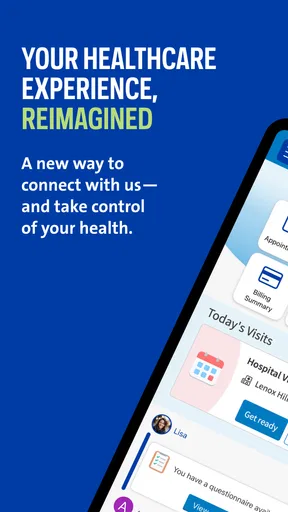
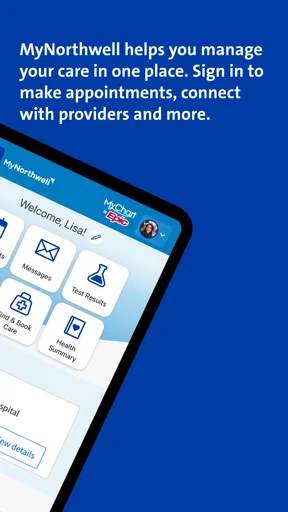
First things first, MyNorthwell is designed to be a comprehensive hub for all your healthcare needs. Once you log in, it’s like having a personal healthcare assistant in your pocket. The app's user interface is sleek and intuitive, which is a big win in my book. No one wants to fumble around trying to find their latest test results or future appointments.
Easy Appointment Management
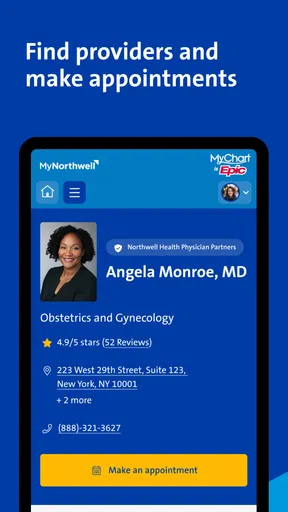
Booking and managing appointments can often be a hassle, but not with the app. The app allows you to schedule, reschedule, and even cancel appointments with just a few taps. Plus, you get notifications so you never miss a check-up or follow-up.
Worth Reading Before You Choose

EA SPORTS FC Mobile 26 Is a Bigger Football Game, but It Takes Time

Flipboard Shows What News Apps Must Do Beyond the Feed

Switching to Android Auto Means Rethinking Your Driving Routine

Google Calendar Makes a Crowded Week Easier to Manage

Ludo King Makes the Most of the Minutes Between Plans

Baby Panda World Brings Quick Play to Modern Phones, but Its Game Library Feels Busy
One feature I really appreciated is the ability to add appointments to my phone’s calendar directly from the app. It’s a small touch, but it makes life so much easier.
Access to Medical Records
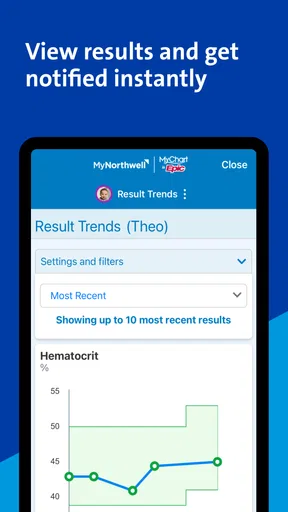
Gone are the days of waiting for paper records or CDs. With the app, you can access your medical records anytime, anywhere. The app neatly organizes your lab results, prescriptions, and visit summaries, which is incredibly handy for keeping track of your health history.
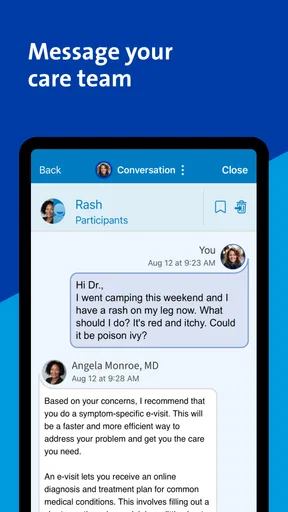
What’s more, the app provides a secure messaging feature to communicate with your healthcare providers. It’s reassuring to know that any questions or concerns can be directly addressed without making a call.
Stay Informed with Notifications
Another aspect I found useful is the app’s notification system. Whether it’s a reminder for medication or an update about your appointment, these notifications help ensure you’re always in the loop. You can customize these alerts to suit your needs, which is a boon for those with busy schedules.
User-Friendly Design
Let’s talk about the design for a moment. The developers have clearly put a lot of thought into making the app as user-friendly as possible. The interface is clean, with a thoughtful layout that makes navigation a breeze. Even if you’re not tech-savvy, you’ll find it easy to get around the various features.
The app also includes helpful tooltips and guides, which I found particularly useful when exploring it for the first time. It’s like having a virtual guide showing you the ropes.
Connectivity and Integration
One of the standout features is how well the app integrates with other health apps and devices. If you’re someone who uses fitness trackers or health monitoring devices, you’ll appreciate how seamlessly it connects and syncs data. It’s a fantastic way to keep all your health information in one place.
Additionally, the app’s security measures are robust, ensuring that your personal health information remains confidential and protected.
Make a small routine work for you
The best way I’d use appointment tools is to handle the scheduling step when I already know what needs to happen, then add the confirmed visit to my phone calendar. That creates two different kinds of reminders: the portal can help with care-related updates, while the calendar keeps the time visible alongside work and family plans. I would still check the appointment details in the app before traveling, since a calendar entry is a convenience rather than the authoritative record.
For a realistic example, imagine leaving a routine visit with a follow-up planned. I’d put the date in my calendar, make a short list of questions while the conversation is fresh, and later check the visit summary or message the care team if I need clarification. That sequence is more reliable than trying to remember every detail weeks later. It also avoids using a message thread for an issue that would be clearer to discuss during a scheduled visit.
Notifications can help, but I would choose them deliberately. Too many alerts are easy to dismiss, while a smaller set tied to appointments or follow-up is more likely to be useful. If I rely on the phone’s calendar already, I would avoid creating duplicate reminders for every event. The practical goal is to have one dependable prompt, not two competing alerts that I eventually ignore.
Check the controls before settling in
My first settings check would be notification preferences and any account or contact details the app lets me review. These small checks matter because a reminder only helps if it reaches the right device and arrives in a form I notice. I’d also confirm that the calendar action behaves the way I expect, especially if I use more than one calendar on my phone.
I would treat sensitive information with the same care I use for banking or email. A phone lock and sensible notification previews can reduce the chance of private details appearing on a screen other people can see. This is not a special trick or a guarantee of security; it is a simple habit that makes any health portal more comfortable to use in shared spaces.
The app’s age rating is Everyone, but that does not mean every person will find account setup equally straightforward. A family member helping someone else should make sure they understand whose account is open and whose information is being viewed before sending a message or reviewing records. That basic pause can prevent mix-ups when more than one person’s care is being managed on the same device.
Where the app fits among alternatives
Compared with calling an office for every routine question, a portal can be convenient when the task is non-urgent and written communication is suitable. Compared with a general health tracker, it is more relevant to appointments, records, and contact with a care team than to logging exercise or building a broad wellness dashboard. I would not expect it to replace a clinic’s other communication routes or the separate tools used by providers outside Northwell.
That means the right choice depends less on a feature checklist and more on where you receive care. If Northwell is central to your healthcare, having its patient-facing tools on your phone can reduce the friction of checking records and managing visits. If most of your care comes from a different system, that system’s own portal is likely to be the more useful everyday option, even if you keep this app for occasional Northwell visits.
The app has a 3.9 average from around 470 ratings, with over 100,000 installs. I take that as a useful sign that people are using it, not as proof that every workflow will be smooth for every account. Patient portals depend on the connection between an app and a real care relationship, so my own decision would be based on whether the appointments, information, and communication I need are actually available after signing in.
Know what a portal cannot do
Even when records and messaging are convenient, I would not treat the app as a substitute for medical judgment. A result can be difficult to interpret without context, and a message may not be the fastest route when a concern needs timely attention. I’d use the app to keep track of information and ask appropriate follow-up questions, then rely on a clinician for interpretation and care decisions.
There is also a real trade-off in putting healthcare tasks on a phone: quick access is helpful, but it can make sensitive information easier to overlook or show accidentally. I’d sign out or secure the device when appropriate, and I would avoid sending a rushed message without checking that I’m in the correct account and describing the issue clearly. Those habits matter more than tapping through a portal quickly.
Version 11.7.2 is the current version, and the app requires iOS 11 or later. For someone deciding whether an older phone can run it, the operating-system requirement is the practical point to check before installing. Beyond that, I’d judge it by the tasks I can complete once signed in rather than by version numbers alone.
Who will get the most from it
I’d recommend it to someone who receives care through Northwell and wants a convenient place to check appointments, records, and provider communication. It can be especially useful for people who have recurring visits or who prefer to review written information after an appointment rather than rely on memory. The calendar option and a consistent post-visit check are the most actionable habits I’d build around it.
I’d be less enthusiastic for someone looking for a single portal covering every doctor, a fitness-focused app, or a tool for urgent medical help. Those are different jobs. A separate provider portal may be necessary for care outside Northwell, while an emergency or time-sensitive concern calls for direct contact with an appropriate service rather than waiting for a notification or reply.
Final Thoughts
Overall, MyNorthwell is a game-changer for anyone looking to simplify their healthcare management. From easy appointment scheduling to instant access to medical records, it covers all the bases. The app’s intuitive design and comprehensive features make it a must-have for managing your health. If you’re part of the Northwell Health system, downloading this app is a no-brainer. It’s like having a healthcare concierge at your fingertips.
My more measured take is that it is worth trying when Northwell is part of your care and you have a concrete task to manage. I would start with one appointment or one record check, set only the alerts I will genuinely use, and keep the phone calendar as my everyday schedule. If those steps make follow-up easier, the app has earned a place in my routine; if my care is mostly elsewhere, another provider’s portal will probably serve me better.
Pros
- User-friendly interface enhances navigation.
- Quick access to medical records and history.
- Appointment scheduling is straightforward.
- Secure login ensures data protection.
- Notifications for upcoming appointments.
Cons
- Limited features compared to desktop site.
- Occasional login issues reported by users.
- Some features require strong internet.
- No offline access to medical records.
- Limited customizability of notifications.
FAQs for MyNorthwell
What is MyNorthwell used for?
MyNorthwell is a mobile application designed to provide patients with seamless access to their medical records and health information. Users can manage appointments, view test results, and communicate with healthcare providers. It's an essential tool for anyone seeking to stay informed and engaged with their healthcare journey.
Is MyNorthwell available on both Android and iOS?
Yes, MyNorthwell is available for download on both Android and iOS platforms. This ensures that users can access their health information from any smartphone or tablet, regardless of the operating system, providing flexibility and convenience to all patients.
How secure is my personal information on MyNorthwell?
MyNorthwell employs advanced encryption and security measures to protect users' personal and medical information. The app adheres to HIPAA standards, ensuring that all data is stored and transmitted securely, giving users peace of mind when accessing their health records.
Can I schedule appointments through MyNorthwell?
Absolutely. MyNorthwell allows users to easily schedule and manage their medical appointments directly from the app. This feature simplifies the process, eliminating the need for phone calls and providing users with the ability to choose convenient times and dates for their visits.
Does MyNorthwell offer telehealth services?
Yes, MyNorthwell includes telehealth capabilities, enabling users to have virtual consultations with their healthcare providers. This feature is particularly useful for patients who require immediate medical advice or those unable to visit the hospital or clinic in person.


